<?xml version="1.0" encoding="utf-8"?>
<feed xmlns="http://www.w3.org/2005/Atom">
            <title type="text">每日闲谈专用</title>
            <subtitle type="text">https://gitee.com/mingchen3398</subtitle>
    <updated>2026-02-06T16:51:00+08:00</updated>
        <id>https://poshir.top</id>
        <link rel="alternate" type="text/html" href="https://poshir.top" />
        <link rel="self" type="application/atom+xml" href="https://poshir.top/atom.xml" />
    <rights>Copyright © 2026, 每日闲谈专用</rights>
    <generator uri="https://halo.run/" version="1.5.4">Halo</generator>
            <entry>
                <title><![CDATA[echarts金字塔]]></title>
                <link rel="alternate" type="text/html" href="https://poshir.top/archives/echarts-jin-zi-ta" />
                <id>tag:https://poshir.top,2026-02-06:echarts-jin-zi-ta</id>
                <published>2026-02-06T16:51:00+08:00</published>
                <updated>2026-02-06T16:51:00+08:00</updated>
                <author>
                    <name>沈瀚</name>
                    <uri>https://poshir.top</uri>
                </author>
                <content type="html">
                        <![CDATA[<p>echarts金字塔<br /><img src="/upload/2026/02/image.png" alt="image" /></p><pre><code class="language-js">option = {  grid: {    left: 0,    right: 0,    top: 0,    bottom: 0  },  series: [    {      name: &#39;漏斗图&#39;,      type: &#39;funnel&#39;,      left: &#39;0%&#39;,      top: 0,      bottom: 0,      width: &#39;100%&#39;,      minSize: &#39;0%&#39;,      maxSize: &#39;100%&#39;,      gap: 5,      sort: &#39;ascending&#39;,      label: {        show: true,        position: &#39;inside&#39;      },      itemStyle: {        borderColor: &#39;#fff&#39;,        borderWidth: 1,        normal: {          color: function (params) {            var colorList = [              &#39;#FF4C4C&#39;,              &#39;#FF6383&#39;,              &#39;#FF9933&#39;,              &#39;#FFC635&#39;,              &#39;#31DC72&#39;,              &#39;#39E8DE&#39;,              &#39;#91FFE7&#39;,              &#39;#91FAB9&#39;,              &#39;#8572FF&#39;,              &#39;#4578FF&#39;            ];            return colorList[params.dataIndex];          }        }      },      emphasis: {        label: {          fontSize: 20        }      },      data: [        { value: 60, name: &#39;创新型中小企业&#39; },        { value: 40, name: &#39;专精特新中小企业&#39; },        { value: 20, name: &#39;专精特新&quot;小巨人&quot;企业&#39; },        { value: 80, name: &#39;科技型中小企业&#39; },        { value: 100, name: &#39;高新技术企业&#39; }      ]    }  ]};</code></pre>]]>
                </content>
            </entry>
            <entry>
                <title><![CDATA[echarts特殊三角形图片]]></title>
                <link rel="alternate" type="text/html" href="https://poshir.top/archives/echarts-te-shu-san-jiao-xing-tu-pian" />
                <id>tag:https://poshir.top,2025-09-26:echarts-te-shu-san-jiao-xing-tu-pian</id>
                <published>2025-09-26T14:49:22+08:00</published>
                <updated>2025-09-26T14:49:22+08:00</updated>
                <author>
                    <name>沈瀚</name>
                    <uri>https://poshir.top</uri>
                </author>
                <content type="html">
                        <![CDATA[<p><img src="/upload/2025/09/image.png" alt="image" /></p><pre><code class="language-html">&lt;svg t=&quot;1757488815348&quot; class=&quot;icon&quot; viewBox=&quot;0 0 1000 1000&quot; version=&quot;1.1&quot;  xmlns=&quot;http://www.w3.org/2000/svg&quot; p-id=&quot;996&quot; width=&quot;1000&quot; height=&quot;1000&quot;&gt;  &lt;path d=&quot;M0,1000 L1000,1000 C550,1000 550,500 500,0 C450,500 450,1000 0,1000 z&quot;    fill=&quot;currentColor&quot; /&gt;&lt;/svg&gt;</code></pre>]]>
                </content>
            </entry>
            <entry>
                <title><![CDATA[B站嵌套测试]]></title>
                <link rel="alternate" type="text/html" href="https://poshir.top/archives/2025-09-18-13-42-17" />
                <id>tag:https://poshir.top,2025-09-18:2025-09-18-13-42-17</id>
                <published>2025-09-18T13:42:17+08:00</published>
                <updated>2025-09-18T13:44:13+08:00</updated>
                <author>
                    <name>沈瀚</name>
                    <uri>https://poshir.top</uri>
                </author>
                <content type="html">
                        <![CDATA[<iframe width="1200px" height="700px" src="https://www.bilibili.com/video/BV1tMptzcEwQ" scrolling="no" border="0" frameborder="no" framespacing="0" allowfullscreen="true"></iframe>]]>
                </content>
            </entry>
            <entry>
                <title><![CDATA[uniapp页面开场动画]]></title>
                <link rel="alternate" type="text/html" href="https://poshir.top/archives/uniapp-ye-mian-kai-chang-dong-hua" />
                <id>tag:https://poshir.top,2025-07-15:uniapp-ye-mian-kai-chang-dong-hua</id>
                <published>2025-07-15T14:35:19+08:00</published>
                <updated>2025-07-15T14:35:19+08:00</updated>
                <author>
                    <name>沈瀚</name>
                    <uri>https://poshir.top</uri>
                </author>
                <content type="html">
                        <![CDATA[<p><code>npm i lottie-miniprogram</code></p><h3 id="%E6%95%88%E6%9E%9C%E9%A2%84%E8%A7%88%3A" tabindex="-1">效果预览:</h3><img src="https://s23.aconvert.com/convert/p3r68-cdx67/m97pk-yrk2r.gif"/>  <pre><code class="language-vue">&lt;template&gt;  &lt;view class=&quot;lottie-wrap&quot;&gt;    &lt;canvas class=&quot;lottie&quot; id=&quot;canvas&quot; type=&quot;2d&quot;&gt;&lt;/canvas&gt;  &lt;/view&gt;&lt;/template&gt;&lt;script&gt;  import lottie from &#39;lottie-miniprogram&#39;  import {    mapGetters  } from &#39;vuex&#39;  export default {    data() {      return {        animation: null      };    },    computed: {      ...mapGetters([&#39;systemInfo&#39;]),    },    onLoad() {      uni.createSelectorQuery()        .in(this)        .select(&quot;#canvas&quot;)        .node((res) =&gt; {          const canvas = res.node          const context = canvas.getContext(&quot;2d&quot;)          canvas.width = 390 //this.systemInfo.windowWidth          canvas.height = 844 //this.systemInfo.windowHeight          //需要在任何 lottie 接口调用之前调用，传入 canvas 对象          lottie.setup(canvas)          //创建动画实例          let  animation = lottie.loadAnimation({            //是否循环播放            loop: false,            //是否自动播放            autoplay: true,            //path:这里替换成你要用的动画链接 在线的使用path,本地的使用animationData，通过require引入            path: &quot;https://gist.githubusercontent.com/kiriss91/889556a50a1e60560003453f8933d60b/raw/7bacaec5eac9301618bf89df4fc5510c8ae65e36/Terminal-payment.json&quot;,            renderer: &quot;canvas&quot;,            rendererSettings: {              context            }          })          animation.addEventListener(&quot;complete&quot;, () =&gt; {            console.log(&#39;complete&#39;);          //   todo 动画加载完开启下一步逻辑          })        }).exec()    },  }&lt;/script&gt;&lt;style lang=&quot;scss&quot;&gt;  .lottie-wrap {    width: 750rpx;    height: 100vh;    position: relative;  }  .lottie {    background-color: rgba(255, 255, 255, 1);    width: 100%;    height: 100%;    position: absolute;    left: 0px;    top: 0px;    display: block;    overflow: hidden;    transform: translate3d(0, 0, 0);    box-sizing: border-box;  }&lt;/style&gt;</code></pre>]]>
                </content>
            </entry>
            <entry>
                <title><![CDATA[RSA加解密文本demo]]></title>
                <link rel="alternate" type="text/html" href="https://poshir.top/archives/rsa-jia-jie-mi-wen-ben-demo" />
                <id>tag:https://poshir.top,2025-07-15:rsa-jia-jie-mi-wen-ben-demo</id>
                <published>2025-07-15T14:21:48+08:00</published>
                <updated>2025-07-15T14:21:48+08:00</updated>
                <author>
                    <name>沈瀚</name>
                    <uri>https://poshir.top</uri>
                </author>
                <content type="html">
                        <![CDATA[<iframe src="https://codesandbox.io/embed/wtxqzs?view=editor+%2B+preview&module=%2Fsrc%2FApp.vue" height="800" style="border:0;overflow:hidden;width:100%" loading="lazy"></iframe>]]>
                </content>
            </entry>
            <entry>
                <title><![CDATA[git克隆忽略线上目录]]></title>
                <link rel="alternate" type="text/html" href="https://poshir.top/archives/git-ke-long-hu-lve-xian-shang-mu-lu" />
                <id>tag:https://poshir.top,2025-07-15:git-ke-long-hu-lve-xian-shang-mu-lu</id>
                <published>2025-07-15T14:21:06+08:00</published>
                <updated>2025-07-15T14:21:06+08:00</updated>
                <author>
                    <name>沈瀚</name>
                    <uri>https://poshir.top</uri>
                </author>
                <content type="html">
                        <![CDATA[<p>git clone --filter=blob:none --no-checkout <a href="http://gitlab.jiluoing.com/jiluo/zs-nfc/zs-nfc-ios.git" target="_blank">http://gitlab.jiluoing.com/jiluo/zs-nfc/zs-nfc-ios.git</a><br />cd zs-nfc-ios<br />git sparse-checkout init --cone<br />打开 .git/info/sparse-checkout,添加</p><pre><code class="language-text">/*!/SDK/</code></pre><p>git read-tree -mu HEAD</p><p>// git sparse-checkout set .</p>]]>
                </content>
            </entry>
            <entry>
                <title><![CDATA[apex 23赛季第二赛段排位人数]]></title>
                <link rel="alternate" type="text/html" href="https://poshir.top/archives/apex23-sai-ji-di-er-sai-duan-pai-wei-ren-shu" />
                <id>tag:https://poshir.top,2025-07-15:apex23-sai-ji-di-er-sai-duan-pai-wei-ren-shu</id>
                <published>2025-07-15T14:20:38+08:00</published>
                <updated>2025-07-15T14:20:38+08:00</updated>
                <author>
                    <name>沈瀚</name>
                    <uri>https://poshir.top</uri>
                </author>
                <content type="html">
                        <![CDATA[<p>网站:<a href="https://apex.tracker.gg/apex" target="_blank">https://apex.tracker.gg/apex</a></p><iframe src="https://apex.tracker.gg/apex/leaderboards/stats/all/RankScore?page=1&legend=all" height="800" style="border:0;overflow:hidden;width:100%" loading="lazy"></iframe><p>接口:<a href="https://api.tracker.gg/api/v1/apex/insights/distribution?platform=origin&amp;field=RankScore" target="_blank">https://api.tracker.gg/api/v1/apex/insights/distribution?platform=origin&amp;field=RankScore</a></p><p>const data = {“data”:[{“tier”:“Rookie 4”,“count”:5530,“pct”:0.656520087377719,“highest”:250},{“tier”:“Rookie 3”,“count”:6804,“pct”:0.80776901890018,“highest”:500},{“tier”:“Rookie 2”,“count”:5505,“pct”:0.653552094215975,“highest”:750},{“tier”:“Rookie 1”,“count”:32464,“pct”:3.85411720011397,“highest”:1000},{“tier”:“Bronze 4”,“count”:34569,“pct”:4.1040222243328,“highest”:1500},{“tier”:“Bronze 3”,“count”:27006,“pct”:3.20614493304207,“highest”:2000},{“tier”:“Bronze 2”,“count”:22772,“pct”:2.70348561116915,“highest”:2500},{“tier”:“Bronze 1”,“count”:18032,“pct”:2.14075410770254,“highest”:3000},{“tier”:“Silver 4”,“count”:25872,“pct”:3.07151676322538,“highest”:3600},{“tier”:“Silver 3”,“count”:33664,“pct”:3.99658087187767,“highest”:4200},{“tier”:“Silver 2”,“count”:30023,“pct”:3.56432234780131,“highest”:4800},{“tier”:“Silver 1”,“count”:26165,“pct”:3.10630164308101,“highest”:5400},{“tier”:“Gold 4”,“count”:43040,“pct”:5.10969702725805,“highest”:6100},{“tier”:“Gold 3”,“count”:51393,“pct”:6.10136290245987,“highest”:6800},{“tier”:“Gold 2”,“count”:52056,“pct”:6.18007408110932,“highest”:7500},{“tier”:“Gold 1”,“count”:44157,“pct”:5.24230696172476,“highest”:8200},{“tier”:“Platinum 4”,“count”:72177,“pct”:8.56883369740716,“highest”:9000},{“tier”:“Platinum 3”,“count”:70910,“pct”:8.41841580396999,“highest”:9800},{“tier”:“Platinum 2”,“count”:42694,“pct”:5.06862000189952,“highest”:10600},{“tier”:“Platinum 1”,“count”:33299,“pct”:3.95324817171621,“highest”:11400},{“tier”:“Diamond 4”,“count”:71287,“pct”:8.46317314084909,“highest”:12300},{“tier”:“Diamond 3”,“count”:53679,“pct”:6.37275619716972,“highest”:13200},{“tier”:“Diamond 2”,“count”:15224,“pct”:1.80738911577548,“highest”:14100},{“tier”:“Diamond 1”,“count”:6785,“pct”:0.805513344097255,“highest”:15000},{“tier”:“Master”,“count”:16463,“pct”:1.9544828568715,“highest”:313143},{“tier”:“Predator”,“count”:750,“pct”:0.0890397948523127,“highest”:313143}]}</p><p>const totalCount = data.data.reduce((accumulator, currentValue) =&gt; {<br />return accumulator + currentValue.count;<br />}, 0);</p><p>console.log(“Total count:”, totalCount);</p><p>截至目前当前赛季赛段排位玩家总人数 845513 人(含脚本机器人)</p>]]>
                </content>
            </entry>
            <entry>
                <title><![CDATA[(p)npm安装依赖提示CERT_HAS_EXPIRED]]></title>
                <link rel="alternate" type="text/html" href="https://poshir.top/archives/pnpm-an-zhuang-yi-lai-ti-shi-certhasexpired" />
                <id>tag:https://poshir.top,2025-07-15:pnpm-an-zhuang-yi-lai-ti-shi-certhasexpired</id>
                <published>2025-07-15T14:19:20+08:00</published>
                <updated>2025-07-15T14:19:20+08:00</updated>
                <author>
                    <name>沈瀚</name>
                    <uri>https://poshir.top</uri>
                </author>
                <content type="html">
                        <![CDATA[<p>直接执行: npm config set strict-ssl false<br /><img src="/upload/2025/07/image.png" alt="image" /></p><p><img src="/upload/2025/07/image-1752560348713.png" alt="image-1752560348713" /></p>]]>
                </content>
            </entry>
            <entry>
                <title><![CDATA[Apex 英雄 · Apex 英雄™ Steam 排行榜 · SteamDB]]></title>
                <link rel="alternate" type="text/html" href="https://poshir.top/archives/apex英雄apex英雄steam排行榜steamdb" />
                <id>tag:https://poshir.top,2025-07-15:apex英雄apex英雄steam排行榜steamdb</id>
                <published>2025-07-15T14:18:10+08:00</published>
                <updated>2025-07-15T14:25:01+08:00</updated>
                <author>
                    <name>沈瀚</name>
                    <uri>https://poshir.top</uri>
                </author>
                <content type="html">
                        <![CDATA[<iframe src="https://steamdb.info/embed/?appid=1172470" height="800" style="border:0;overflow:hidden;width:100%" loading="lazy"></iframe>]]>
                </content>
            </entry>
            <entry>
                <title><![CDATA[判断经纬度是哪个省的]]></title>
                <link rel="alternate" type="text/html" href="https://poshir.top/archives/pan-duan-jing-wei-du-shi-na-ge-sheng-de" />
                <id>tag:https://poshir.top,2024-12-19:pan-duan-jing-wei-du-shi-na-ge-sheng-de</id>
                <published>2024-12-19T12:39:59+08:00</published>
                <updated>2024-12-19T12:39:59+08:00</updated>
                <author>
                    <name>沈瀚</name>
                    <uri>https://poshir.top</uri>
                </author>
                <content type="html">
                        <![CDATA[<p>数据源;<a href="https://geo.datav.aliyun.com/areas_v3/bound/100000_full.json" target="_blank">https://geo.datav.aliyun.com/areas_v3/bound/100000_full.json</a></p><pre><code class="language-js">// 判断点是否在多边形（外环/内洞）内function isPointInPolygon(point, polygon) {    const [outerRing, ...holes] = polygon; // 外环和内洞    const isInOuterRing = isPointInRing(point, outerRing);    if (!isInOuterRing) return false; // 点不在外环内，直接返回 false    // 判断点是否在内洞内    for (const hole of holes) {        if (isPointInRing(point, hole)) {            return false; // 点在内洞内，返回 false        }    }    return true; // 点在外环内且不在任何内洞内}// 判断点是否在一个环（简单多边形）内function isPointInRing(point, ring) {    const x = point.lng;    const y = point.lat;    let isInside = false;    for (let i = 0, j = ring.length - 1; i &lt; ring.length; j = i++) {        const xi = ring[i][0], yi = ring[i][1];        const xj = ring[j][0], yj = ring[j][1];        const intersect =            yi &gt; y !== yj &gt; y &amp;&amp;            x &lt; ((xj - xi) * (y - yi)) / (yj - yi) + xi;        if (intersect) isInside = !isInside;    }    return isInside;}// 根据经纬度获取省份（支持 Polygon 类型）export function getProvinceByCoordinates(point) {    for (const feature of geoData.features) {        const { name } = feature.properties;        const coordinates = feature.geometry.coordinates;        // Geometry Type 是 Polygon        if (feature.geometry.type === &quot;Polygon&quot;) {            if (isPointInPolygon(point, coordinates)) {                return name;            }        }        // Geometry Type 是 MultiPolygon        if (feature.geometry.type === &quot;MultiPolygon&quot;) {            for (const polygon of coordinates) {                if (isPointInPolygon(point, polygon)) {                    return name;                }            }        }    }    return null;}// 示例数据（你的 GeoJSON 数据）const geoData = {  &quot;type&quot;: &quot;FeatureCollection&quot;,  &quot;features&quot;: [    {      &quot;type&quot;: &quot;Feature&quot;,      &quot;properties&quot;: {        &quot;adcode&quot;: 110000,        &quot;name&quot;: &quot;北京市&quot;,        &quot;center&quot;: [116.405285, 39.904989],        &quot;centroid&quot;: [116.41995, 40.18994],        &quot;childrenNum&quot;: 16,        &quot;level&quot;: &quot;province&quot;,        &quot;parent&quot;: { &quot;adcode&quot;: 100000 },        &quot;subFeatureIndex&quot;: 0,        &quot;acroutes&quot;: [100000],      },      &quot;geometry&quot;: {        &quot;type&quot;: &quot;MultiPolygon&quot;,        &quot;coordinates&quot;: [          [            [              [117.348611, 40.581141],              [117.389879, 40.561593],              [117.429915, 40.576141],              [117.412669, 40.605226],              [117.467487, 40.649738],              [117.467487, 40.649738],              [117.501364, 40.636569],              [117.514914, 40.660181],              [117.493973, 40.675161],              [117.408973, 40.686961],              [117.342451, 40.673799],              [117.319662, 40.657911],              [117.278394, 40.664267],              [117.208177, 40.694675],              [117.117018, 40.70012],              [117.11209, 40.707379],              [117.012308, 40.693767],              [116.964881, 40.709647],              [116.926692, 40.745022],              [116.924229, 40.773581],              [116.848468, 40.839264],              [116.81336, 40.848319],              [116.759773, 40.889954],              [116.713577, 40.909858],              [116.722201, 40.927495],              [116.677853, 40.970888],              [116.698795, 41.021477],              [116.688324, 41.044501],              [116.647672, 41.059394],              [116.615643, 41.053076],              [116.623034, 41.021026],              [116.598397, 40.974503],              [116.5676, 40.992574],              [116.519557, 40.98128],              [116.519557, 40.98128],              [116.455499, 40.980828],              [116.447492, 40.953715],              [116.477057, 40.899907],              [116.398216, 40.90624],              [116.370499, 40.94377],              [116.339702, 40.929303],              [116.334159, 40.90443],              [116.438253, 40.81934],              [116.46597, 40.774487],              [116.453651, 40.765876],              [116.316912, 40.772221],              [116.311369, 40.754996],              [116.273181, 40.762703],              [116.247311, 40.791707],              [116.22021, 40.744115],              [116.204812, 40.740035],              [116.171551, 40.695582],            ],          ],        ],      },    },    // 其他省份数据...  ],};// 测试点const point = { lat: 39.9, lng: 116.4 }; // 北京的经纬度const province = getProvinceByCoordinates(point, geoData);console.log(province); // 输出: 北京市</code></pre><p>json快捷转ts类型的扩展:<a href="https://marketplace.visualstudio.com/items?itemName=GregorBiswanger.json2ts" target="_blank">https://marketplace.visualstudio.com/items?itemName=GregorBiswanger.json2ts</a><br />vscode安装之后 <code>ctrl+alt+V</code> 即可生成类型</p>]]>
                </content>
            </entry>
            <entry>
                <title><![CDATA[Web 自定义协议实践]]></title>
                <link rel="alternate" type="text/html" href="https://poshir.top/archives/web-zi-ding-yi-xie-yi-shi-jian" />
                <id>tag:https://poshir.top,2024-02-28:web-zi-ding-yi-xie-yi-shi-jian</id>
                <published>2024-02-28T10:09:51+08:00</published>
                <updated>2024-02-28T10:09:51+08:00</updated>
                <author>
                    <name>沈瀚</name>
                    <uri>https://poshir.top</uri>
                </author>
                <content type="html">
                        <![CDATA[<p>来源:<a href="https://fishpi.cn/article/1707017716377" target="_blank">https://fishpi.cn/article/1707017716377</a><br />自定义协议可用于在网页打开桌面应用程序。自定义协议有别于常见的 http、https、ftp 等协议，它是由开发者自己定义的。</p><p>协议注册<br />在 Windows 中，要注册一个自定义协议，需要在注册表中添加一些项目：</p><pre><code class="language-">Windows Registry Editor Version 5.00[HKEY_CURRENT_USER\Software\Classes\myprotocol]@=&quot;URL:myprotocol&quot;&quot;URL Protocol&quot;=&quot;&quot;[HKEY_CURRENT_USER\Software\Classes\myprotocol\shell][HKEY_CURRENT_USER\Software\Classes\myprotocol\shell\open][HKEY_CURRENT_USER\Software\Classes\myprotocol\shell\open\command]@=&quot;\&quot;你的程序绝对路径\&quot; \&quot;%1\&quot;&quot;</code></pre><p>在上面的代码中，myprotocol 是自定义的协议名，你可以自己定义。你的程序绝对路径 是你的程序的绝对路径，%1 是网页传递过来的参数。比如网页的链接是 myprotocol://hello，那么 你的程序绝对路径 就会接收到 myprotocol://hello 这个参数。</p><p>这样，当网页中有一个链接是 myprotocol://hello 时，点击这个链接就会打开你的程序，并传递 myprotocol://hello 这个参数。</p><p>协议检测<br />在网页中，可以使用 a 标签来定义一个自定义协议的链接，点击就会打开你的程序并传递参数：</p><pre><code class="language-">&lt;a href=&quot;myprotocol://hello&quot;&gt;打开我的程序&lt;/a&gt;</code></pre><p>但是，如果你还没有定义这个协议，点击这个链接是没有任何效果的。那么我们就可以使用 custom-protocol-check 这个库来检测是否已经定义了这个协议。</p><pre><code class="language-">import customProtocolCheck from &quot;custom-protocol-check&quot;;customProtocolCheck(  &quot;myprotocol://params&quot;,  () =&gt; {    if(!window.confirm(&quot;XXXXXX is not installed. Do you want to install it?&quot;)) return;    window.open(&#39;https://example.com/XXXXXX.exe&#39;, &#39;_blank&#39;);  },  () =&gt; {    console.log(&quot;Custom protocol found and opened the file successfully.&quot;);  }, 5000);</code></pre><p>这样，当用户点击这个链接时，如果没有定义这个协议，就会弹出一个提示框，询问用户是否要下载你的程序。</p><p>至此，我们就完成了一个自定义协议的定义和使用。</p><p>那么，如果我们想要更多高级的工程化的功能，启动的应用程序应该如何和 Web 页面进行配合呢？</p><p>下面，我们将通过一个 C# WinForm 实例，介绍自定义协议的 Web 与桌面应用程序配合的最佳实践。</p><p>Web 与 App 通信<br />启动应用程序后，应用程序可以通过 Web 的协议链接，获取到 Web 传递过来的参数，但是这样的通信是单向的，如果我们希望 Web 页面和应用程序之间进行双向通信，就需要使用 WebSocket。</p><p>我们可以在应用程序内启动一个 WebSocket 服务，然后在 Web 页面中通过 WebSocket 连接到这个服务，这样就可以实现双向通信。</p><p>我们可以使用 Fleck 来实现 Websocket Server，这里是 示例代码 。</p><pre><code class="language-js">server = new WebSocketServer(&quot;ws://127.0.0.1:&quot; + Port);server.Start(socket =&gt;{    socket.OnOpen = () =&gt; Logger.Log.Info(&quot;WebSocket Open!&quot;);    socket.OnClose = () =&gt; Logger.Log.Info(&quot;WebSocket Close!&quot;);    socket.OnError = (err) =&gt; Logger.Log.Info(&quot;WebSocket Error: &quot; + err.Message);    socket.OnMessage = (message =&gt; {        object msg;        try        {            msg = new JavaScriptSerializer().DeserializeObject(message);        }        catch (Exception)        {            msg = message;        }        action(new MessageCall()        {            type = WebSocketMessageType.Text,            message = msg,            client = socket,        });    });    socket.OnBinary = (message =&gt; {        action(new MessageCall()        {            type = WebSocketMessageType.Binary,            binary = message,            client = socket,        });    });});</code></pre><p>这里监听了 WebSocket 的字符串消息和二进制消息，然后通过 action 回调函数将消息数据向外传递。其中 client 就是连接的客户端，可以通过 client 发送消息。</p><p>而 Web 那边，我们可以使用 WebSocket 连接到这个服务，示例代码：</p><pre><code class="language-js">function connectSocket(onMessage, port) {  return new Promise((resolve) =&gt; {    const ws = new WebSocket(&#96;ws://localhost:${port}&#96;);    ws.onopen = () =&gt; {      console.log(&quot;Socket is connected.&quot;);      ws.onmessage = (message) =&gt; {        onMessage(message.data);      };      ws.onclose = () =&gt; {        console.log(&quot;Socket is closed.&quot;);      }      resolve(ws);    };    ws.onclose = () =&gt; {      // retry after 1s      setTimeout(() =&gt; connectSocket(onMessage, port), 1000);    };  });}</code></pre><p>因为启动程序是需要时间的，我们无法确定合适程序完成启动，所以这里使用了 setTimeout 来重试连接，如果连接失败，就会在 1s 后重试。</p><p>这样，就建立了一个 Web 页面和应用程序之间的双向通信信道。</p><p>通信协议<br />有了通信信道，我们就可以定义一套通信协议，用于 Web 页面和应用程序之间的通信。比如使用 JSON，定义信息结构如下：</p><pre><code class="language-">{  &quot;command&quot;: &quot;download&quot;,  &quot;data&quot;: {    &quot;url&quot;: &quot;https://file.fishpi.cn/2023/02/blob-e6f2be62.png&quot;,    &quot;local&quot;: &quot;C:\\Protocol&quot;  }}</code></pre><p>用 command 字段来表示命令，data 字段来表示数据。这样，我们就可以在 Web 页面中发送一个下载文件的命令，应用程序就可以接收到这个命令，并执行下载文件到指定的目录。（没错，就是 @xiaoaonan 上次收到的奇葩用户需求。trollface</p><p>然后，应用程序那边，就可以通过 WebSocket 来接收这个命令，然后执行下载文件的操作，示例代码：</p><pre><code class="language-">// 启动 WebSocket 服务private void ServiceStart(int Port){    Logger.Log.Info(&quot;Start WebSocket in Port &quot; + Port);    WebSocketService.Start(call =&gt;    {        try        {            wsClient = call.client;            if (call.type == WebSocketMessageType.Text)            {                MessageExecute((Dictionary&lt;string, object&gt;)call.message);            }        }        catch (Exception ex)        {            Logger.Log.Fatal(&quot;Websocket Message Error: &quot; + ex.Message);            throw ex;        }    }, Port.ToString());}// 执行命令private void MessageExecute(Dictionary&lt;string, object&gt; message){    string command = message[&quot;command&quot;] as string;    object data = message.Keys.Contains(&quot;data&quot;) ? message[&quot;data&quot;] : null;    switch (command)    {        case &quot;Ping&quot;:            SendData(&quot;Ping&quot;, &quot;Pong&quot;);            break;        case &quot;Download&quot;:            Download((data as Dictionary&lt;string, object&gt;)[&quot;url&quot;] as string, (data as Dictionary&lt;string, object&gt;)[&quot;local&quot;] as string);            break;        case &quot;Close&quot;:            Application.Exit();            break;    }}</code></pre><p>这样，我们就完成了一个自定义协议的 Web 与桌面应用程序的配合。</p><p>程序路由<br />如果我们要更进一步，我们可以在应用程序中定义一套路由系统，用于处理不同的协议地址，比如 myprotocol://form1 就打开一个窗口，myprotocol://form2 就打开另一个窗口。还可以接收 QueryString 参数，比如 myprotocol://form2?port=12345。</p><p>那么，我们就可以在程序中定义一个路由解析器，用于解析协议地址，然后执行对应的操作。这里有一个 示例代码 。具体的实现下回再说，感兴趣的可以先看看代码。</p><p>打包发布<br />最后，我们可以使用 Inno Setup 来打包发布我们的应用程序，这是一个免费的 Windows 安装程序制作工具，可以用于打包发布我们的应用程序。</p><p>这里是一个 示例脚本</p><p>然后，你可以在这里：<a href="https://protocol.git.hancel.org/" target="_blank">https://protocol.git.hancel.org/</a> 查看到 Web 实例。</p><p>GitHub 仓库：<a href="https://github.com/imlinhanchao/custom-protocol-app" target="_blank">https://github.com/imlinhanchao/custom-protocol-app</a></p>]]>
                </content>
            </entry>
            <entry>
                <title><![CDATA[css3圆点渐变扩散]]></title>
                <link rel="alternate" type="text/html" href="https://poshir.top/archives/css3-yuan-dian-jian-bian-kuo-san" />
                <id>tag:https://poshir.top,2024-01-02:css3-yuan-dian-jian-bian-kuo-san</id>
                <published>2024-01-02T09:23:56+08:00</published>
                <updated>2024-01-02T09:23:56+08:00</updated>
                <author>
                    <name>沈瀚</name>
                    <uri>https://poshir.top</uri>
                </author>
                <content type="html">
                        <![CDATA[<p><img src="/upload/2024/01/image.png" alt="image" /><br /><img src="/upload/2024/01/image-1704158615990.png" alt="image-1704158615990" /></p><pre><code class="language-html">&lt;div class=&quot;wrapper&quot;&gt;  &lt;div class=&quot;circles&quot;&gt;&lt;/div&gt;  &lt;div class=&quot;circles2&quot;&gt;&lt;/div&gt;  &lt;div class=&quot;circles3&quot;&gt;&lt;/div&gt;&lt;/div&gt;</code></pre><pre><code class="language-css">.wrapper {  position: relative;  width: 200px;  height: 200px;}.circles,.circles2 {  position: absolute;  width: 50px;  height: 50px;  border-radius: 50%;}.circles {    left:15px;    top:15px;     width: 20px;  height: 20px;  background-color: #3AB5EC;  animation: expand 1s ease-out;}.circles2 {  background-color: rgba(58, 181, 236,0.41);  animation: expand 1s 0.5s infinite linear;}@keyframes expand {  0% {    opacity: 1;    transform: scale(0);  }  100% {    opacity: 0;    transform: scale(1.5);  }}</code></pre>]]>
                </content>
            </entry>
            <entry>
                <title><![CDATA[梯形圆角]]></title>
                <link rel="alternate" type="text/html" href="https://poshir.top/archives/ti-xing-yuan-jiao" />
                <id>tag:https://poshir.top,2023-12-27:ti-xing-yuan-jiao</id>
                <published>2023-12-27T13:26:50+08:00</published>
                <updated>2023-12-27T13:26:58+08:00</updated>
                <author>
                    <name>沈瀚</name>
                    <uri>https://poshir.top</uri>
                </author>
                <content type="html">
                        <![CDATA[<p><img src="/upload/2023/12/image-1703654787948.png" alt="image-1703654787948" /></p><pre><code class="language-html">&lt;style&gt;    .text {        width: 400px;        height: 400px;        background-color: rgb(255, 255, 255);        border-radius: 20px;        transform: perspective(39px) scale(1, 1.15) rotateX(1deg);        /* 镜头距离元素表面的位置为8px，x轴为1.1倍y轴为1.3倍，绕x轴旋转5度 */        transform-origin: bottom right;        /* bottom left = left bottom = 0 100% 中心点偏移量*/        box-shadow: 0 0 10px #ccc;    }&lt;/style&gt;&lt;div class=&quot;text&quot;&gt;&lt;/div&gt;</code></pre>]]>
                </content>
            </entry>
            <entry>
                <title><![CDATA[windows设置文件夹权限]]></title>
                <link rel="alternate" type="text/html" href="https://poshir.top/archives/windows-she-zhi-wen-jian-jia-quan-xian" />
                <id>tag:https://poshir.top,2023-07-01:windows-she-zhi-wen-jian-jia-quan-xian</id>
                <published>2023-07-01T10:52:49+08:00</published>
                <updated>2023-07-01T10:52:49+08:00</updated>
                <author>
                    <name>沈瀚</name>
                    <uri>https://poshir.top</uri>
                </author>
                <content type="html">
                        <![CDATA[<p>windows设置文件夹权限<br /><a href="https://blog.csdn.net/tcjy1000/article/details/127129224" target="_blank">https://blog.csdn.net/tcjy1000/article/details/127129224</a></p><p><img src="/upload/2023/07/blog.csdn.net_tcjy1000_article_details_127129224.png" alt="blog.csdn.net_tcjy1000_article_details_127129224" /></p>]]>
                </content>
            </entry>
            <entry>
                <title><![CDATA[angular2+打包后用代理接口预览(不方便部署服务器用)]]></title>
                <link rel="alternate" type="text/html" href="https://poshir.top/archives/angular2-da-bao-hou-yong-dai-li-jie-kou-yu-lan--bu-fang-bian-bu-shu-fu-wu-qi-yong-" />
                <id>tag:https://poshir.top,2023-06-27:angular2-da-bao-hou-yong-dai-li-jie-kou-yu-lan--bu-fang-bian-bu-shu-fu-wu-qi-yong-</id>
                <published>2023-06-27T16:05:41+08:00</published>
                <updated>2023-06-27T16:05:41+08:00</updated>
                <author>
                    <name>沈瀚</name>
                    <uri>https://poshir.top</uri>
                </author>
                <content type="html">
                        <![CDATA[<p>项目打完包了,但不方便部署到服务器上,可以先本地跑下看看结果</p><p>依赖</p><pre><code class="language-json">    &quot;express&quot;: &quot;^4.18.2&quot;,    &quot;http-proxy-middleware&quot;: &quot;^1.0.6&quot;,</code></pre><p>在项目根目录新建server.js<br />因为api是 <code>/energyreport/xxx/xxx/xxx?xx=xx</code>,部分接口是<code>/basic/xx/xx</code><br />新版http-proxy-middleware的2.x没看</p><pre><code class="language-js">const express = require(&#39;express&#39;);const proxy = require(&#39;http-proxy-middleware&#39;);const app = express();const PORT = 8080; app.use(express.static(&#39;dist&#39;)); const apiProxy = proxy.createProxyMiddleware(&#39;/energyreport&#39;, {  target: &quot;http://localhost:4200&quot;,  changeOrigin: true});const apiProxy1 = proxy.createProxyMiddleware(&#39;/basic&#39;, {  target: &quot;http://localhost:4200&quot;,  changeOrigin: true});app.use(apiProxy);app.use(apiProxy1);app.listen(PORT, function(err) {  if (err) {    console.log(&#39;err :&#39;, err);  } else {    console.log(&#39;Listen at http://localhost:&#39; + PORT);  }});</code></pre>]]>
                </content>
            </entry>
            <entry>
                <title><![CDATA[vue防止chrome自动填充]]></title>
                <link rel="alternate" type="text/html" href="https://poshir.top/archives/vue-fang-zhi-chrome-zi-dong-tian-chong" />
                <id>tag:https://poshir.top,2023-06-13:vue-fang-zhi-chrome-zi-dong-tian-chong</id>
                <published>2023-06-13T16:52:10+08:00</published>
                <updated>2023-06-13T16:52:10+08:00</updated>
                <author>
                    <name>沈瀚</name>
                    <uri>https://poshir.top</uri>
                </author>
                <content type="html">
                        <![CDATA[<pre><code class="language-js">onfocus=&quot;this.removeAttribute(&#39;readonly&#39;);&quot;</code></pre><p>其他的浏览器和框架没试</p>]]>
                </content>
            </entry>
            <entry>
                <title><![CDATA[十进制数字相加方法]]></title>
                <link rel="alternate" type="text/html" href="https://poshir.top/archives/shi-jin-zhi-shu-zi-xiang-jia-fang-fa" />
                <id>tag:https://poshir.top,2023-05-19:shi-jin-zhi-shu-zi-xiang-jia-fang-fa</id>
                <published>2023-05-19T10:09:31+08:00</published>
                <updated>2023-05-19T10:10:35+08:00</updated>
                <author>
                    <name>沈瀚</name>
                    <uri>https://poshir.top</uri>
                </author>
                <content type="html">
                        <![CDATA[<p>ts</p><pre><code class="language-js">/* * @description 十进制数字相加 * @param { number } num1 -数字1 * @param { number } num2 -数字2 * @returns { number } * @example * add(0.1,0.2)  =&gt; 0.3 */function add(num1: number, num2: number): number {  const len1 = (num1.toString().split(&quot;.&quot;) || &quot;&quot;).length;  const len2 = (num2.toString().split(&quot;.&quot;) || &quot;&quot;).length;  const maxLen = Math.max(len1, len2);  const multiple = Math.pow(10, maxLen);  return (num1 * multiple + num2 * multiple) / multiple;}</code></pre><p>js</p><pre><code class="language-">/* * @description 十进制数字相加 * @param { number } num1 -数字1 * @param { number } num2 -数字2 * @returns { number } * @example * add(0.1,0.2)  =&gt; 0.3 */function add(num1, num2) {    var len1 = (num1.toString().split(&quot;.&quot;) || &quot;&quot;).length;    var len2 = (num2.toString().split(&quot;.&quot;) || &quot;&quot;).length;    var maxLen = Math.max(len1, len2);    var multiple = Math.pow(10, maxLen);    return (num1 * multiple + num2 * multiple) / multiple;}</code></pre>]]>
                </content>
            </entry>
            <entry>
                <title><![CDATA[ Redmi Note11T 价格]]></title>
                <link rel="alternate" type="text/html" href="https://poshir.top/archives/redminote11t-jia-ge" />
                <id>tag:https://poshir.top,2023-04-25:redminote11t-jia-ge</id>
                <published>2023-04-25T10:49:11+08:00</published>
                <updated>2023-04-25T10:49:11+08:00</updated>
                <author>
                    <name>沈瀚</name>
                    <uri>https://poshir.top</uri>
                </author>
                <content type="html">
                        <![CDATA[<p><img src="/upload/2023/04/image-1682390938772.png" alt="image-1682390938772" /></p>]]>
                </content>
            </entry>
            <entry>
                <title><![CDATA[项目规范]]></title>
                <link rel="alternate" type="text/html" href="https://poshir.top/archives/standard" />
                <id>tag:https://poshir.top,2023-04-24:standard</id>
                <published>2023-04-24T13:34:41+08:00</published>
                <updated>2023-04-24T13:34:41+08:00</updated>
                <author>
                    <name>沈瀚</name>
                    <uri>https://poshir.top</uri>
                </author>
                <content type="html">
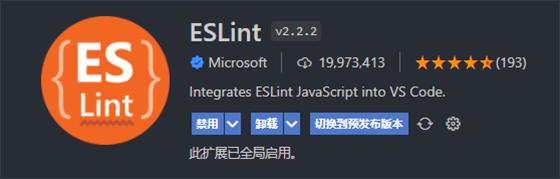
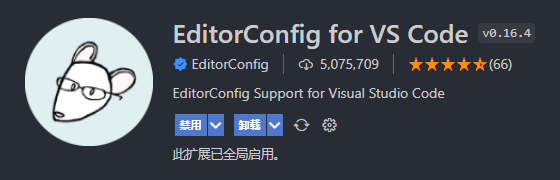
                        <![CDATA[<h1 id="%E9%A1%B9%E7%9B%AE%E8%A7%84%E8%8C%83" tabindex="-1">项目规范</h1><p>本项目推荐使用 Visual Studio Code 开发</p><h2 id="%E9%A1%B9%E7%9B%AE%E6%96%87%E4%BB%B6%E3%80%81%E7%BB%84%E4%BB%B6%E5%91%BD%E5%90%8D%E8%A7%84%E8%8C%83" tabindex="-1">项目文件、组件命名规范</h2><ul><li>Link（v3）：<a href="https://cn.vuejs.org/style-guide" target="_blank">https://cn.vuejs.org/style-guide</a></li><li>Link（v2）：<a href="https://v2.cn.vuejs.org/v2/style-guide" target="_blank">https://v2.cn.vuejs.org/v2/style-guide</a></li></ul><p>:::warning<br />💢 Geeker Admin 采用 Vue 官方推荐的风格指南，请务必查看<br />:::</p><h2 id="%E4%BB%A3%E7%A0%81%E6%A0%BC%E5%BC%8F%E5%8C%96%E5%B7%A5%E5%85%B7%EF%BC%88prettier%EF%BC%89" tabindex="-1">代码格式化工具（Prettier）</h2><h3 id="1%E3%80%81%E4%B8%8B%E8%BD%BD-prettier-%E7%9B%B8%E5%85%B3%E4%BE%9D%E8%B5%96%EF%BC%9A" tabindex="-1">1、下载 prettier 相关依赖：</h3><pre><code class="language-bash">pnpm install prettier -D</code></pre><h3 id="2%E3%80%81%E5%AE%89%E8%A3%85-vscode-%E6%8F%92%E4%BB%B6%EF%BC%88prettier%EF%BC%89%EF%BC%9A" tabindex="-1">2、安装 Vscode 插件（Prettier）：</h3><p><img src="/upload/2023/04/image-1682314403033.png" alt="image-1682314403033" /></p><h3 id="3%E3%80%81%E9%85%8D%E7%BD%AE-prettier%EF%BC%88.prettierrc.cjs%EF%BC%89%EF%BC%9A" tabindex="-1">3、配置 Prettier（.prettierrc.cjs）：</h3><pre><code class="language-javascript">// @see: https://www.prettier.cnmodule.exports = {// 指定最大换行长度printWidth: 130,// 缩进制表符宽度 | 空格数tabWidth: 2,// 使用制表符而不是空格缩进行 (true：制表符，false：空格)useTabs: false,// 结尾不用分号 (true：有，false：没有)semi: true,// 使用单引号 (true：单引号，false：双引号)singleQuote: false,// 在对象字面量中决定是否将属性名用引号括起来 可选值 &quot;&lt;as-needed|consistent|preserve&gt;&quot;quoteProps: &quot;as-needed&quot;,// 在JSX中使用单引号而不是双引号 (true：单引号，false：双引号)jsxSingleQuote: false,// 多行时尽可能打印尾随逗号 可选值&quot;&lt;none|es5|all&gt;&quot;trailingComma: &quot;none&quot;,// 在对象，数组括号与文字之间加空格 &quot;{ foo: bar }&quot; (true：有，false：没有)bracketSpacing: true,// 将 &gt; 多行元素放在最后一行的末尾，而不是单独放在下一行 (true：放末尾，false：单独一行)bracketSameLine: false,// (x) =&gt; {} 箭头函数参数只有一个时是否要有小括号 (avoid：省略括号，always：不省略括号)arrowParens: &quot;avoid&quot;,// 指定要使用的解析器，不需要写文件开头的 @prettierrequirePragma: false,// 可以在文件顶部插入一个特殊标记，指定该文件已使用 Prettier 格式化insertPragma: false,// 用于控制文本是否应该被换行以及如何进行换行proseWrap: &quot;preserve&quot;,// 在html中空格是否是敏感的 &quot;css&quot; - 遵守 CSS 显示属性的默认值， &quot;strict&quot; - 空格被认为是敏感的 ，&quot;ignore&quot; - 空格被认为是不敏感的htmlWhitespaceSensitivity: &quot;css&quot;,// 控制在 Vue 单文件组件中 &lt;script&gt; 和 &lt;style&gt; 标签内的代码缩进方式vueIndentScriptAndStyle: false,// 换行符使用 lf 结尾是 可选值 &quot;&lt;auto|lf|crlf|cr&gt;&quot;endOfLine: &quot;auto&quot;,// 这两个选项可用于格式化以给定字符偏移量（分别包括和不包括）开始和结束的代码 (rangeStart：开始，rangeEnd：结束)rangeStart: 0,rangeEnd: Infinity,};</code></pre><h2 id="%E4%BB%A3%E7%A0%81%E8%A7%84%E8%8C%83%E5%B7%A5%E5%85%B7%EF%BC%88eslint%EF%BC%89" tabindex="-1">代码规范工具（ESLint）</h2><h3 id="1%E3%80%81%E4%B8%8B%E8%BD%BD-eslint-%E7%9B%B8%E5%85%B3%E4%BE%9D%E8%B5%96%EF%BC%9A" tabindex="-1">1、下载 ESLint 相关依赖：</h3><pre><code class="language-bash">pnpm install eslint eslint-config-prettier eslint-plugin-prettier eslint-plugin-vue @typescript-eslint/eslint-plugin @typescript-eslint/parser -D</code></pre><table><thead><tr><th style="text-align:center">依赖</th><th style="text-align:center">作用描述</th></tr></thead><tbody><tr><td style="text-align:center">eslint</td><td style="text-align:center">ESLint 核心库</td></tr><tr><td style="text-align:center">eslint-config-prettier</td><td style="text-align:center">关掉所有和 Prettier 冲突的 ESLint 的配置</td></tr><tr><td style="text-align:center">eslint-plugin-prettier</td><td style="text-align:center">将 Prettier 的 rules 以插件的形式加入到 ESLint 里面</td></tr><tr><td style="text-align:center">eslint-plugin-vue</td><td style="text-align:center">为 Vue 使用 ESlint 的插件</td></tr><tr><td style="text-align:center">@typescript-eslint/eslint-plugin</td><td style="text-align:center">ESLint 插件，包含了各类定义好的检测 TypeScript 代码的规范</td></tr><tr><td style="text-align:center">@typescript-eslint/parser</td><td style="text-align:center">ESLint 的解析器，用于解析 TypeScript，从而检查和规范 TypeScript 代码</td></tr></tbody></table><h3 id="2%E3%80%81%E5%AE%89%E8%A3%85-vscode-%E6%8F%92%E4%BB%B6%EF%BC%88eslint%EF%BC%89%EF%BC%9A" tabindex="-1">2、安装 Vscode 插件（ESLint）：</h3><p><img src="/upload/2023/04/image-1682314428533.png" alt="image-1682314428533" /></p><h3 id="3%E3%80%81%E9%85%8D%E7%BD%AE-eslint%EF%BC%88.eslintrc.cjs%EF%BC%89%EF%BC%9A" tabindex="-1">3、配置 ESLint（.eslintrc.cjs）：</h3><pre><code class="language-javascript">// @see: http://eslint.cnmodule.exports = {root: true,env: {browser: true,node: true,es6: true,},// 指定如何解析语法parser: &quot;vue-eslint-parser&quot;,// 优先级低于 parse 的语法解析配置parserOptions: {parser: &quot;@typescript-eslint/parser&quot;,ecmaVersion: 2020,sourceType: &quot;module&quot;,jsxPragma: &quot;React&quot;,ecmaFeatures: {jsx: true,},},// 继承某些已有的规则extends: [&quot;plugin:vue/vue3-recommended&quot;,&quot;plugin:@typescript-eslint/recommended&quot;,&quot;plugin:prettier/recommended&quot;,],/** * &quot;off&quot; 或 0    ==&gt;  关闭规则 * &quot;warn&quot; 或 1   ==&gt;  打开的规则作为警告（不影响代码执行） * &quot;error&quot; 或 2  ==&gt;  规则作为一个错误（代码不能执行，界面报错） */rules: {// eslint (http://eslint.cn/docs/rules)&quot;no-var&quot;: &quot;error&quot;, // 要求使用 let 或 const 而不是 var&quot;no-multiple-empty-lines&quot;: [&quot;error&quot;, { max: 1 }], // 不允许多个空行&quot;prefer-const&quot;: &quot;off&quot;, // 使用 let 关键字声明但在初始分配后从未重新分配的变量，要求使用 const&quot;no-use-before-define&quot;: &quot;off&quot;, // 禁止在 函数/类/变量 定义之前使用它们&quot;no-irregular-whitespace&quot;: &quot;off&quot;, // 禁止不规则的空白// typeScript (https://typescript-eslint.io/rules)&quot;@typescript-eslint/no-unused-vars&quot;: &quot;error&quot;, // 禁止定义未使用的变量&quot;@typescript-eslint/prefer-ts-expect-error&quot;: &quot;error&quot;, // 禁止使用 @ts-ignore&quot;@typescript-eslint/no-inferrable-types&quot;: &quot;off&quot;, // 可以轻松推断的显式类型可能会增加不必要的冗长&quot;@typescript-eslint/no-namespace&quot;: &quot;off&quot;, // 禁止使用自定义 TypeScript 模块和命名空间。&quot;@typescript-eslint/no-explicit-any&quot;: &quot;off&quot;, // 禁止使用 any 类型&quot;@typescript-eslint/ban-types&quot;: &quot;off&quot;, // 禁止使用特定类型&quot;@typescript-eslint/explicit-function-return-type&quot;: &quot;off&quot;, // 不允许对初始化为数字、字符串或布尔值的变量或参数进行显式类型声明&quot;@typescript-eslint/no-var-requires&quot;: &quot;off&quot;, // 不允许在 import 语句中使用 require 语句&quot;@typescript-eslint/no-empty-function&quot;: &quot;off&quot;, // 禁止空函数&quot;@typescript-eslint/no-use-before-define&quot;: &quot;off&quot;, // 禁止在变量定义之前使用它们&quot;@typescript-eslint/ban-ts-comment&quot;: &quot;off&quot;, // 禁止 @ts-&lt;directive&gt; 使用注释或要求在指令后进行描述&quot;@typescript-eslint/no-non-null-assertion&quot;: &quot;off&quot;, // 不允许使用后缀运算符的非空断言(!)&quot;@typescript-eslint/explicit-module-boundary-types&quot;: &quot;off&quot;, // 要求导出函数和类的公共类方法的显式返回和参数类型// vue (https://eslint.vuejs.org/rules)&quot;vue/script-setup-uses-vars&quot;: &quot;error&quot;, // 防止&lt;script setup&gt;使用的变量&lt;template&gt;被标记为未使用，此规则仅在启用该no-unused-vars规则时有效。&quot;vue/v-slot-style&quot;: &quot;error&quot;, // 强制执行 v-slot 指令样式&quot;vue/no-mutating-props&quot;: &quot;off&quot;, // 不允许组件 prop的改变&quot;vue/no-v-html&quot;: &quot;off&quot;, // 禁止使用 v-html&quot;vue/custom-event-name-casing&quot;: &quot;off&quot;, // 为自定义事件名称强制使用特定大小写&quot;vue/attributes-order&quot;: &quot;off&quot;, // vue api使用顺序，强制执行属性顺序&quot;vue/one-component-per-file&quot;: &quot;off&quot;, // 强制每个组件都应该在自己的文件中&quot;vue/html-closing-bracket-newline&quot;: &quot;off&quot;, // 在标签的右括号之前要求或禁止换行&quot;vue/max-attributes-per-line&quot;: &quot;off&quot;, // 强制每行的最大属性数&quot;vue/multiline-html-element-content-newline&quot;: &quot;off&quot;, // 在多行元素的内容之前和之后需要换行符&quot;vue/singleline-html-element-content-newline&quot;: &quot;off&quot;, // 在单行元素的内容之前和之后需要换行符&quot;vue/attribute-hyphenation&quot;: &quot;off&quot;, // 对模板中的自定义组件强制执行属性命名样式&quot;vue/require-default-prop&quot;: &quot;off&quot;, // 此规则要求为每个 prop 为必填时，必须提供默认值&quot;vue/multi-word-component-names&quot;: &quot;off&quot;, // 要求组件名称始终为 “-” 链接的单词},};</code></pre><h2 id="%E6%A0%B7%E5%BC%8F%E8%A7%84%E8%8C%83%E5%B7%A5%E5%85%B7%EF%BC%88stylelint%EF%BC%89" tabindex="-1">样式规范工具（StyleLint）</h2><h3 id="1%E3%80%81%E4%B8%8B%E8%BD%BD-stylelint-%E7%9B%B8%E5%85%B3%E4%BE%9D%E8%B5%96%EF%BC%9A" tabindex="-1">1、下载 StyleLint 相关依赖：</h3><pre><code class="language-bash">pnpm install stylelint stylelint-config-html stylelint-config-recommended-scss stylelint-config-recommended-vue stylelint-config-standard stylelint-config-standard-scss stylelint-config-recess-order postcss postcss-html stylelint-config-prettier -D</code></pre><table><thead><tr><th style="text-align:center">依赖</th><th style="text-align:center">作用描述</th></tr></thead><tbody><tr><td style="text-align:center">stylelint</td><td style="text-align:center">stylelint 核心库</td></tr><tr><td style="text-align:center">stylelint-config-html</td><td style="text-align:center">Stylelint 的可共享 HTML（和类似 HTML）配置，捆绑 postcss-html 并对其进行配置。</td></tr><tr><td style="text-align:center">stylelint-config-recommended-scss</td><td style="text-align:center">扩展 stylelint-config-recommended 共享配置，并为 SCSS 配置其规则</td></tr><tr><td style="text-align:center">stylelint-config-recommended-vue</td><td style="text-align:center">扩展 stylelint-config-recommended 共享配置，并为 Vue 配置其规则</td></tr><tr><td style="text-align:center">stylelint-config-standard</td><td style="text-align:center">打开额外的规则来执行在规范和一些 CSS 样式指南中发现的通用约定，包括：惯用 CSS 原则，谷歌的 CSS 样式指南，Airbnb 的样式指南，和 @mdo 的代码指南。</td></tr><tr><td style="text-align:center">stylelint-config-standard-scss</td><td style="text-align:center">扩展 stylelint-config-standard 共享配置，并为 SCSS 配置其规则</td></tr><tr><td style="text-align:center">stylelint-config-recess-order</td><td style="text-align:center">属性的排序（插件包）</td></tr><tr><td style="text-align:center">stylelint-config-prettier</td><td style="text-align:center">关闭所有不必要的或可能与 Prettier 冲突的规则</td></tr><tr><td style="text-align:center">postcss</td><td style="text-align:center">postcss-html 的依赖包</td></tr><tr><td style="text-align:center">postcss-html</td><td style="text-align:center">用于解析 HTML（和类似 HTML）的 PostCSS 语法</td></tr></tbody></table><h3 id="2%E3%80%81%E5%AE%89%E8%A3%85-vscode-%E6%8F%92%E4%BB%B6%EF%BC%88stylelint%EF%BC%89%EF%BC%9A" tabindex="-1">2、安装 Vscode 插件（StyleLint）：</h3><p><img src="/upload/2023/04/image-1682314441353.png" alt="image-1682314441353" /></p><h3 id="3%E3%80%81%E5%9C%A8%E7%9B%AE%E5%BD%95%E7%9A%84-.vscode-%E6%96%87%E4%BB%B6%E5%A4%B9%E4%B8%8B%E6%96%B0%E5%BB%BA-settings.json%EF%BC%9A" tabindex="-1">3、在目录的 .vscode 文件夹下新建 settings.json：</h3><pre><code class="language-json">{&quot;editor.formatOnSave&quot;: true,&quot;editor.codeActionsOnSave&quot;: {&quot;source.fixAll.stylelint&quot;: true},&quot;stylelint.enable&quot;: true,&quot;stylelint.validate&quot;: [&quot;css&quot;,&quot;less&quot;,&quot;postcss&quot;,&quot;scss&quot;,&quot;vue&quot;,&quot;sass&quot;,&quot;html&quot;],&quot;files.eol&quot;: &quot;\n&quot;}</code></pre><blockquote><p>😎 也可以在 vscode 中全局配置上述 json 代码 😎</p></blockquote><h3 id="4%E3%80%81%E9%85%8D%E7%BD%AE-stylelint%EF%BC%88.stylelintrc.cjs%EF%BC%89%EF%BC%9A" tabindex="-1">4、配置 StyleLint（.stylelintrc.cjs）：</h3><pre><code class="language-javascript">// @see: https://stylelint.iomodule.exports = {root: true,// 继承某些已有的规则extends: [&quot;stylelint-config-standard&quot;, // 配置 stylelint 拓展插件&quot;stylelint-config-html/vue&quot;, // 配置 vue 中 template 样式格式化&quot;stylelint-config-standard-scss&quot;, // 配置 stylelint scss 插件&quot;stylelint-config-recommended-vue/scss&quot;, // 配置 vue 中 scss 样式格式化&quot;stylelint-config-recess-order&quot;, // 配置 stylelint css 属性书写顺序插件,&quot;stylelint-config-prettier&quot;, // 配置 stylelint 和 prettier 兼容],overrides: [// 扫描 .vue/html 文件中的 &lt;style&gt; 标签内的样式{files: [&quot;**/*.{vue,html}&quot;],customSyntax: &quot;postcss-html&quot;,},],rules: {&quot;function-url-quotes&quot;: &quot;always&quot;, // URL 的引号 &quot;always(必须加上引号)&quot;|&quot;never(没有引号)&quot;&quot;string-quotes&quot;: &quot;double&quot;, // 指定字符串使用单引号或双引号 &quot;single(单引号)&quot;|&quot;double(双引号)&quot;&quot;unit-case&quot;: &quot;lower&quot;, // 指定单位的大小写 &quot;lower(全小写)&quot;|&quot;upper(全大写)&quot;&quot;color-hex-case&quot;: &quot;lower&quot;, // 指定 16 进制颜色的大小写 &quot;lower(全小写)&quot;|&quot;upper(全大写)&quot;&quot;color-hex-length&quot;: &quot;long&quot;, // 指定 16 进制颜色的简写或扩写 &quot;short(16进制简写)&quot;|&quot;long(16进制扩写)&quot;&quot;rule-empty-line-before&quot;: &quot;never&quot;, // 要求或禁止在规则之前的空行 &quot;always(规则之前必须始终有一个空行)&quot;|&quot;never(规则前绝不能有空行)&quot;|&quot;always-multi-line(多行规则之前必须始终有一个空行)&quot;|&quot;never-multi-line(多行规则之前绝不能有空行)&quot;&quot;block-opening-brace-space-before&quot;: &quot;always&quot;, // 要求在块的开大括号之前必须有一个空格或不能有空白符 &quot;always(大括号前必须始终有一个空格)&quot;|&quot;never(左大括号之前绝不能有空格)&quot;|&quot;always-single-line(在单行块中的左大括号之前必须始终有一个空格)&quot;|&quot;never-single-line(在单行块中的左大括号之前绝不能有空格)&quot;|&quot;always-multi-line(在多行块中，左大括号之前必须始终有一个空格)&quot;|&quot;never-multi-line(多行块中的左大括号之前绝不能有空格)&quot;&quot;font-family-no-missing-generic-family-keyword&quot;: null, // 禁止在字体族名称列表中缺少通用字体族关键字&quot;scss/at-import-partial-extension&quot;: null, // 解决不能使用 @import 引入 scss 文件&quot;property-no-unknown&quot;: null, // 禁止未知的属性&quot;no-empty-source&quot;: null, // 禁止空源码&quot;selector-class-pattern&quot;: null, // 强制选择器类名的格式&quot;value-no-vendor-prefix&quot;: null, // 关闭 vendor-prefix (为了解决多行省略 -webkit-box)&quot;no-descending-specificity&quot;: null, // 不允许较低特异性的选择器出现在覆盖较高特异性的选择器&quot;value-keyword-case&quot;: null, // 解决在 scss 中使用 v-bind 大写单词报错&quot;selector-pseudo-class-no-unknown&quot;: [true,{ignorePseudoClasses: [&quot;global&quot;, &quot;v-deep&quot;, &quot;deep&quot;],},],},ignoreFiles: [&quot;**/*.js&quot;, &quot;**/*.jsx&quot;, &quot;**/*.tsx&quot;, &quot;**/*.ts&quot;],};</code></pre><h2 id="editorconfig-%E9%85%8D%E7%BD%AE" tabindex="-1">EditorConfig 配置</h2><h3 id="1%E3%80%81%E7%AE%80%E4%BB%8B%EF%BC%9A" tabindex="-1">1、简介：</h3><ul><li><strong>EditorConfig</strong> 帮助开发人员在 <strong>不同的编辑器</strong> 和 <strong>IDE</strong> 之间定义和维护一致的编码样式。</li></ul><h3 id="2%E3%80%81%E5%AE%89%E8%A3%85-vscode-%E6%8F%92%E4%BB%B6%EF%BC%88editorconfig-%EF%BC%89%EF%BC%9A" tabindex="-1">2、安装 VsCode 插件（EditorConfig ）：</h3><p><img src="/upload/2023/04/image-1682314454981.png" alt="image-1682314454981" /></p><h3 id="3%E3%80%81%E9%85%8D%E7%BD%AE-editorconfig%EF%BC%88.editorconfig%EF%BC%89%EF%BC%9A" tabindex="-1">3、配置 EditorConfig（.editorconfig）：</h3><pre><code class="language-javascript"># @see: http://editorconfig.orgroot = true[*] # 表示所有文件适用charset = utf-8 # 设置文件字符集为 utf-8end_of_line = lf # 控制换行类型(lf | cr | crlf)insert_final_newline = true # 始终在文件末尾插入一个新行indent_style = space # 缩进风格（tab | space）indent_size = 2 # 缩进大小max_line_length = 130 # 最大行长度[*.md] # 表示仅对 md 文件适用以下规则max_line_length = off # 关闭最大行长度限制trim_trailing_whitespace = false # 关闭末尾空格修剪</code></pre><h2 id="git-%E6%B5%81%E7%A8%8B%E8%A7%84%E8%8C%83%E9%85%8D%E7%BD%AE" tabindex="-1">Git 流程规范配置</h2><table><thead><tr><th style="text-align:center">依赖</th><th style="text-align:center">作用描述</th></tr></thead><tbody><tr><td style="text-align:center">husky</td><td style="text-align:center">操作 <strong>git</strong> 钩子的工具（在 <strong>git xx</strong> 之前执行某些命令）</td></tr><tr><td style="text-align:center">lint-staged</td><td style="text-align:center">在提交之前进行 <strong>eslint</strong> 校验，并使用 <strong>prettier</strong> 格式化本地暂存区的代码，</td></tr><tr><td style="text-align:center">@commitlint/cli</td><td style="text-align:center">校验 <strong>git commit</strong> 信息是否符合规范，保证团队的一致性</td></tr><tr><td style="text-align:center">@commitlint/config-conventional</td><td style="text-align:center"><strong>Anglar</strong> 的提交规范</td></tr><tr><td style="text-align:center">czg</td><td style="text-align:center">交互式命令行工具生成标准化的 git commit message</td></tr><tr><td style="text-align:center">cz-git</td><td style="text-align:center">一款工程性更强，轻量级，高度自定义，标准输出格式的 <strong>commitize</strong> 适配器</td></tr></tbody></table><h3 id="1%E3%80%81husky%EF%BC%88%E6%93%8D%E4%BD%9C-git-%E9%92%A9%E5%AD%90%E7%9A%84%E5%B7%A5%E5%85%B7%EF%BC%89%EF%BC%9A" tabindex="-1">1、husky（操作 git 钩子的工具）：</h3><blockquote><p><strong>安装：</strong></p></blockquote><pre><code class="language-bash">pnpm install husky -D</code></pre><blockquote><p><strong>使用（为了添加.husky 文件夹）：</strong></p></blockquote><pre><code class="language-bash"># 编辑 package.json &gt; prepare 脚本并运行一次pnpm set-script prepare &quot;husky install&quot;pnpm prepare</code></pre><h3 id="2%E3%80%81-lint-staged%EF%BC%88%E6%9C%AC%E5%9C%B0%E6%9A%82%E5%AD%98%E4%BB%A3%E7%A0%81%E6%A3%80%E6%9F%A5%E5%B7%A5%E5%85%B7%EF%BC%89" tabindex="-1">2、 lint-staged（本地暂存代码检查工具）</h3><blockquote><p><strong>安装：</strong></p></blockquote><pre><code class="language-bash">pnpm install lint-staged --D</code></pre><blockquote><p><strong>添加 ESlint Hook（在.husky 文件夹下添加 pre-commit 文件）：</strong></p></blockquote><blockquote><p><strong>作用：通过钩子函数，判断提交的代码是否符合规范，并使用 prettier 格式化代码</strong></p></blockquote><pre><code class="language-bash">npx husky add .husky/pre-commit &quot;npm run lint:lint-staged&quot;</code></pre><blockquote><p>新增 <strong>lint-staged.config.cjs</strong> 文件：</p></blockquote><pre><code class="language-bash">module.exports = {  &quot;*.{js,jsx,ts,tsx}&quot;: [&quot;eslint --fix&quot;, &quot;prettier --write&quot;],  &quot;{!(package)*.json,*.code-snippets,.!(browserslist)*rc}&quot;: [&quot;prettier --write--parser json&quot;],  &quot;package.json&quot;: [&quot;prettier --write&quot;],  &quot;*.vue&quot;: [&quot;eslint --fix&quot;, &quot;prettier --write&quot;, &quot;stylelint --fix&quot;],  &quot;*.{scss,less,styl,html}&quot;: [&quot;stylelint --fix&quot;, &quot;prettier --write&quot;],  &quot;*.md&quot;: [&quot;prettier --write&quot;]};</code></pre><h3 id="3%E3%80%81commitlint%EF%BC%88commit-%E4%BF%A1%E6%81%AF%E6%A0%A1%E9%AA%8C%E5%B7%A5%E5%85%B7%EF%BC%8C%E4%B8%8D%E7%AC%A6%E5%90%88%E5%88%99%E6%8A%A5%E9%94%99%EF%BC%89" tabindex="-1">3、commitlint（commit 信息校验工具，不符合则报错）</h3><blockquote><p><strong>安装：</strong></p></blockquote><pre><code class="language-bash">pnpm install @commitlint/cli @commitlint/config-conventional -D</code></pre><blockquote><p><strong>配置命令（在.husky 文件夹下添加 commit-msg 文件）：</strong></p></blockquote><pre><code class="language-bash">npx husky add .husky/commit-msg &#39;npx --no-install commitlint --edit &quot;$1&quot;&#39;</code></pre><h3 id="4%E3%80%81commitizen%EF%BC%88%E5%9F%BA%E4%BA%8E-node.js-%E7%9A%84-git-commit-%E5%91%BD%E4%BB%A4%E8%A1%8C%E5%B7%A5%E5%85%B7%EF%BC%8C%E7%94%9F%E6%88%90%E6%A0%87%E5%87%86%E5%8C%96%E7%9A%84-message%EF%BC%89" tabindex="-1">4、commitizen（基于 Node.js 的 git commit 命令行工具，生成标准化的 message）</h3><pre><code class="language-bash">// 安装 czg，如此一来可以快速使用 czg 命令进行启动。pnpm install czg -D</code></pre><h3 id="5%E3%80%81cz-git" tabindex="-1">5、cz-git</h3><blockquote><p><strong>指定提交文字规范，一款工程性更强，高度自定义，标准输出格式的 commitizen 适配器</strong></p></blockquote><pre><code class="language-bash">pnpm install cz-git -D</code></pre><blockquote><p><strong>配置 package.json：</strong></p></blockquote><pre><code class="language-bash">&quot;config&quot;: {  &quot;commitizen&quot;: {    &quot;path&quot;: &quot;node_modules/cz-git&quot;  }}</code></pre><blockquote><p><strong>新建 commitlint.config.js 文件：</strong></p></blockquote><pre><code class="language-javascript">// @see: https://cz-git.qbenben.com/zh/guideconst fs = require(&quot;fs&quot;);const path = require(&quot;path&quot;);const scopes = fs.readdirSync(path.resolve(__dirname, &quot;src&quot;), { withFileTypes: true }).filter((dirent) =&gt; dirent.isDirectory()).map((dirent) =&gt; dirent.name.replace(/s$/, &quot;&quot;));/** @type {import(&#39;cz-git&#39;).UserConfig} */module.exports = {ignores: [(commit) =&gt; commit.includes(&quot;init&quot;)],extends: [&quot;@commitlint/config-conventional&quot;],rules: {// @see: https://commitlint.js.org/#/reference-rules&quot;body-leading-blank&quot;: [2, &quot;always&quot;],&quot;footer-leading-blank&quot;: [1, &quot;always&quot;],&quot;header-max-length&quot;: [2, &quot;always&quot;, 108],&quot;subject-empty&quot;: [2, &quot;never&quot;],&quot;type-empty&quot;: [2, &quot;never&quot;],&quot;subject-case&quot;: [0],&quot;type-enum&quot;: [2,&quot;always&quot;,[&quot;feat&quot;,&quot;fix&quot;,&quot;docs&quot;,&quot;style&quot;,&quot;refactor&quot;,&quot;perf&quot;,&quot;test&quot;,&quot;build&quot;,&quot;ci&quot;,&quot;chore&quot;,&quot;revert&quot;,&quot;wip&quot;,&quot;workflow&quot;,&quot;types&quot;,&quot;release&quot;,],],},prompt: {messages: {type: &quot;Select the type of change that you&#39;re committing:&quot;,scope: &quot;Denote the SCOPE of this change (optional):&quot;,customScope: &quot;Denote the SCOPE of this change:&quot;,subject: &quot;Write a SHORT, IMPERATIVE tense description of the change:\n&quot;,body: &#39;Provide a LONGER description of the change (optional). Use &quot;|&quot; to break new line:\n&#39;,breaking:&#39;List any BREAKING CHANGES (optional). Use &quot;|&quot; to break new line:\n&#39;,footerPrefixsSelect:&quot;Select the ISSUES type of changeList by this change (optional):&quot;,customFooterPrefixs: &quot;Input ISSUES prefix:&quot;,footer: &quot;List any ISSUES by this change. E.g.: #31, #34:\n&quot;,confirmCommit: &quot;Are you sure you want to proceed with the commit above?&quot;,// 中文版// type: &quot;选择你要提交的类型 :&quot;,// scope: &quot;选择一个提交范围（可选）:&quot;,// customScope: &quot;请输入自定义的提交范围 :&quot;,// subject: &quot;填写简短精炼的变更描述 :\n&quot;,// body: &#39;填写更加详细的变更描述（可选）。使用 &quot;|&quot; 换行 :\n&#39;,// breaking: &#39;列举非兼容性重大的变更（可选）。使用 &quot;|&quot; 换行 :\n&#39;,// footerPrefixsSelect: &quot;选择关联issue前缀（可选）:&quot;,// customFooterPrefixs: &quot;输入自定义issue前缀 :&quot;,// footer: &quot;列举关联issue (可选) 例如: #31, #I3244 :\n&quot;,// confirmCommit: &quot;是否提交或修改commit ?&quot;},types: [{value: &quot;feat&quot;,name: &quot;feat:     🚀  A new feature&quot;,emoji: &quot;🚀&quot;,},{value: &quot;fix&quot;,name: &quot;fix:      🧩  A bug fix&quot;,emoji: &quot;🧩&quot;,},{value: &quot;docs&quot;,name: &quot;docs:     📚  Documentation only changes&quot;,emoji: &quot;📚&quot;,},{value: &quot;style&quot;,name: &quot;style:    🎨  Changes that do not affect the meaning of the code&quot;,emoji: &quot;🎨&quot;,},{value: &quot;refactor&quot;,name: &quot;refactor: ♻️   A code change that neither fixes a bug nor adds a feature&quot;,emoji: &quot;♻️&quot;,},{value: &quot;perf&quot;,name: &quot;perf:     ⚡️  A code change that improves performance&quot;,emoji: &quot;⚡️&quot;,},{value: &quot;test&quot;,name: &quot;test:     ✅  Adding missing tests or correcting existing tests&quot;,emoji: &quot;✅&quot;,},{value: &quot;build&quot;,name: &quot;build:    📦️   Changes that affect the build system or external dependencies&quot;,emoji: &quot;📦️&quot;,},{value: &quot;ci&quot;,name: &quot;ci:       🎡  Changes to our CI configuration files and scripts&quot;,emoji: &quot;🎡&quot;,},{value: &quot;chore&quot;,name: &quot;chore:    🔨  Other changes that don&#39;t modify src or test files&quot;,emoji: &quot;🔨&quot;,},{value: &quot;revert&quot;,name: &quot;revert:   ⏪️  Reverts a previous commit&quot;,emoji: &quot;⏪️&quot;,},{value: &quot;wip&quot;,name: &quot;wip:      🕔  work in process&quot;,emoji: &quot;🕔&quot;,},{value: &quot;workflow&quot;,name: &quot;workflow: 📋  workflow improvements&quot;,emoji: &quot;📋&quot;,},{value: &quot;type&quot;,name: &quot;type:     🔰  type definition file changes&quot;,emoji: &quot;🔰&quot;,},// 中文版// { value: &quot;feat&quot;, name: &quot;特性:   🚀  新增功能&quot;, emoji: &quot;🚀&quot; },// { value: &quot;fix&quot;, name: &quot;修复:   🧩  修复缺陷&quot;, emoji: &quot;🧩&quot; },// { value: &quot;docs&quot;, name: &quot;文档:   📚  文档变更&quot;, emoji: &quot;📚&quot; },// { value: &quot;style&quot;, name: &quot;格式:   🎨  代码格式（不影响功能，例如空格、分号等格式修正）&quot;, emoji: &quot;🎨&quot; },// { value: &quot;refactor&quot;, name: &quot;重构:   ♻️  代码重构（不包括 bug 修复、功能新增）&quot;, emoji: &quot;♻️&quot; },// { value: &quot;perf&quot;, name: &quot;性能:    ⚡️  性能优化&quot;, emoji: &quot;⚡️&quot; },// { value: &quot;test&quot;, name: &quot;测试:   ✅  添加疏漏测试或已有测试改动&quot;, emoji: &quot;✅&quot; },// { value: &quot;build&quot;, name: &quot;构建:   📦️  构建流程、外部依赖变更（如升级 npm 包、修改 webpack 配置等）&quot;, emoji: &quot;📦️&quot; },// { value: &quot;ci&quot;, name: &quot;集成:   🎡  修改 CI 配置、脚本&quot;, emoji: &quot;🎡&quot; },// { value: &quot;chore&quot;, name: &quot;回退:   ⏪️  回滚 commit&quot;, emoji: &quot;⏪️&quot; },// { value: &quot;revert&quot;, name: &quot;其他:   🔨  对构建过程或辅助工具和库的更改（不影响源文件、测试用例）&quot;, emoji: &quot;🔨&quot; },// { value: &quot;wip&quot;, name: &quot;开发:   🕔  正在开发中&quot;, emoji: &quot;🕔&quot; },// { value: &quot;workflow&quot;, name: &quot;工作流:   📋  工作流程改进&quot;, emoji: &quot;📋&quot; },// { value: &quot;types&quot;, name: &quot;类型:   🔰  类型定义文件修改&quot;, emoji: &quot;🔰&quot; }],useEmoji: true,scopes: [...scopes],customScopesAlign: &quot;bottom&quot;,emptyScopesAlias: &quot;empty&quot;,customScopesAlias: &quot;custom&quot;,allowBreakingChanges: [&quot;feat&quot;, &quot;fix&quot;],},};</code></pre><h2 id="%E9%85%8D%E7%BD%AE-package.json-%E5%91%BD%E4%BB%A4" tabindex="-1">配置 package.json 命令</h2><pre><code class="language-json">{&quot;scripts&quot;: {// 本地运行(dev环境)&quot;dev&quot;: &quot;vite&quot;,// 本地运行(dev环境)&quot;serve&quot;: &quot;vite&quot;,// 构建打包(dev环境)&quot;build:dev&quot;: &quot;vue-tsc &amp;&amp; vite build --mode development&quot;,// 构建打包(test环境)&quot;build:test&quot;: &quot;vue-tsc &amp;&amp; vite build --mode test&quot;,// 构建打包(pro环境)&quot;build:pro&quot;: &quot;vue-tsc &amp;&amp; vite build --mode production&quot;,// 检查项目 ts 类型&quot;type:check&quot;: &quot;vue-tsc --noEmit --skipLibCheck&quot;,// 本地环境预览构建后的 dist&quot;preview&quot;: &quot;npm run build:dev &amp;&amp; vite preview&quot;,// 执行 eslint 校验&quot;lint:eslint&quot;: &quot;eslint --fix --ext .js,.ts,.vue ./src&quot;,// 执行 prettier 格式化&quot;lint:prettier&quot;: &quot;prettier --write \&quot;src/**/*.{js,ts,json,tsx,css,less,scss,vue,html,md}\&quot;&quot;,// 执行 stylelint 格式化&quot;lint:stylelint&quot;: &quot;stylelint --cache --fix \&quot;**/*.{vue,less,postcss,css,scss}\&quot; --cache --cache-location node_modules/.cache/stylelint/&quot;,// 执行 lint-staged.config.js 文件下的命令&quot;lint:lint-staged&quot;: &quot;lint-staged&quot;,// 初始化 husky 配置&quot;prepare&quot;: &quot;husky install&quot;,// 自动更新版本&quot;release&quot;: &quot;standard-version&quot;,// 提交代码(可自定义配置执行命令)&quot;commit&quot;: &quot;git add -A &amp;&amp; czg &amp;&amp; git push&quot;}}</code></pre>]]>
                </content>
            </entry>
            <entry>
                <title><![CDATA[微软商店 0x80131500解决方法]]></title>
                <link rel="alternate" type="text/html" href="https://poshir.top/archives/wei-ruan-shang-dian-0x80131500-jie-jue-fang-fa" />
                <id>tag:https://poshir.top,2023-04-18:wei-ruan-shang-dian-0x80131500-jie-jue-fang-fa</id>
                <published>2023-04-18T10:03:43+08:00</published>
                <updated>2023-04-18T10:03:43+08:00</updated>
                <author>
                    <name>沈瀚</name>
                    <uri>https://poshir.top</uri>
                </author>
                <content type="html">
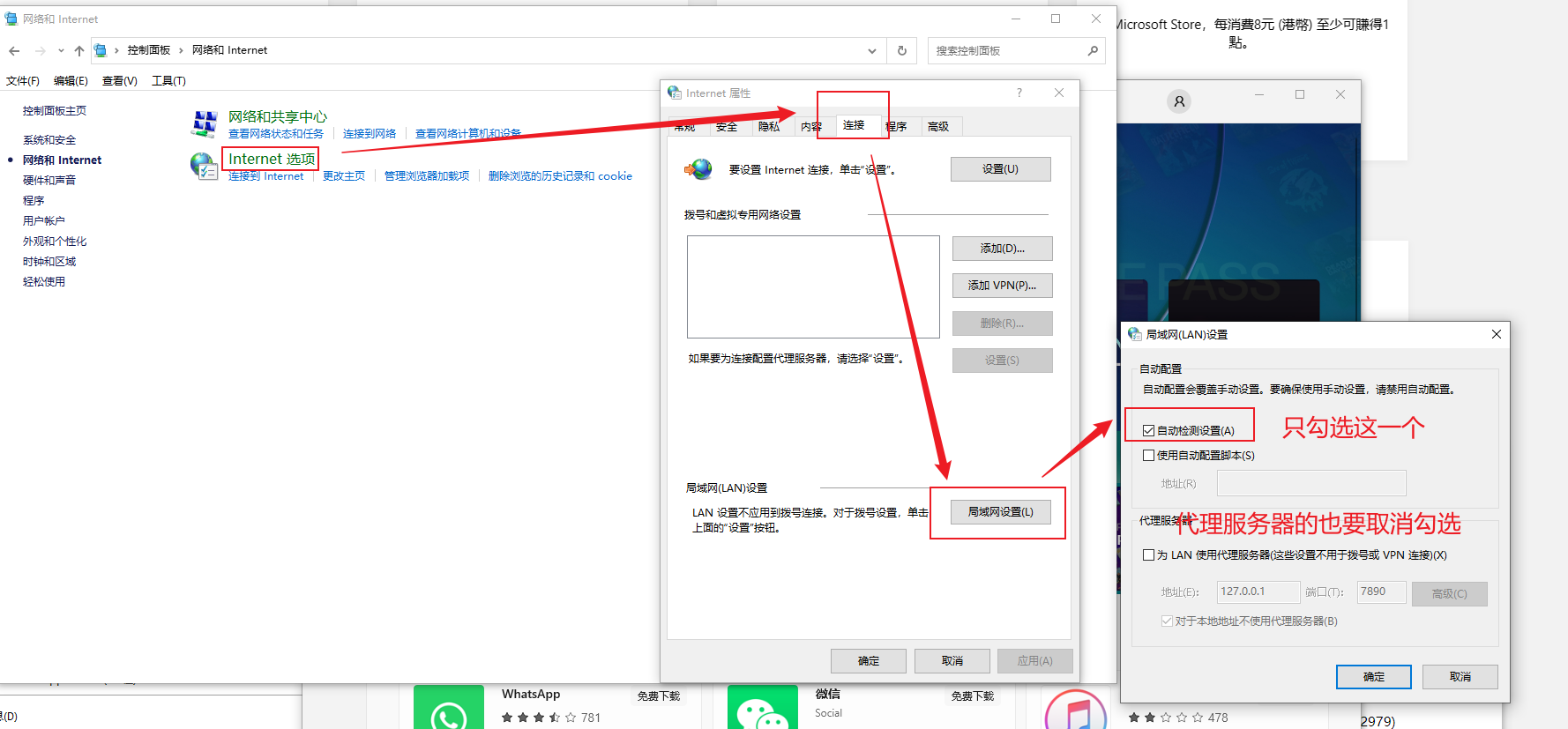
                        <![CDATA[<p>如图所示,打开控制面板的网络和internet,并按图步骤选择并保存<br /><img src="/upload/2023/04/image-1681783356977.png" alt="image-1681783356977" /></p>]]>
                </content>
            </entry>
</feed>